
Desk Setup
Best ELECOM Trackball Mice in 2026: HUGE Plus vs EX-G vs DEFT PRO
HUGE Plus, DEFT PRO, or EX-G? This research-based comparison explains ELECOM's finger- and thumb-operated trackballs, their connection options, and who each model fits best.
Research note: This guide compares published specifications and current retail information. It is not presented as a hands-on test.
Disclosure: As an Amazon Associate I earn from qualifying purchases. Product links marked “paid link” may earn AmeChoi a commission.
Contents
- The quick answer
- First decision: thumb or fingers?
- Best overall: ELECOM HUGE Plus
- Why it wins
- Reasons to skip it
- Best compact finger trackball: ELECOM DEFT PRO
- Why choose it over HUGE Plus
- Reasons to skip it
- Best for first-time buyers: ELECOM EX-G Wireless
- Why it is the easiest recommendation
- Reasons to skip it
- HUGE Plus vs DEFT PRO vs EX-G: detailed comparison
- ELECOM or Logitech?
- Compatibility checks before ordering
- Confirm the exact model number
- Check the port you actually have
- Treat software as a separate compatibility question
- Plan for cleaning
- Frequently asked questions
- Is HUGE Plus worth the extra cost?
- Is a bigger trackball always better?
- Which ELECOM trackball is best for a Mac?
- Which one is best for small hands?
- Can a trackball prevent wrist pain?
- Final verdict
- Sources and methodology
ELECOM’s trackball range looks simple until you try to choose one. The names do not explain the most important difference. HUGE Plus and DEFT PRO are controlled with your index or middle fingers. EX-G puts the ball under your thumb. That choice changes the shape of the device, the number of controls within reach, and how quickly a conventional mouse user is likely to adapt.
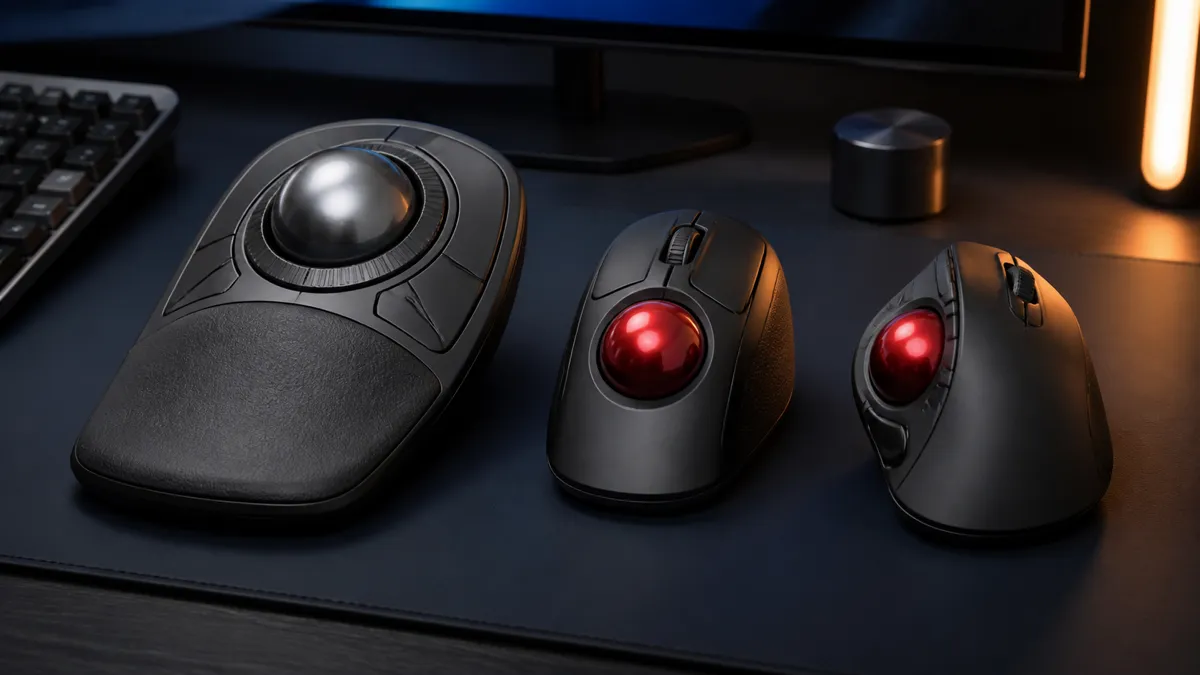
The short answer is straightforward. HUGE Plus is the most capable model, DEFT PRO is the more compact finger-operated choice, and EX-G is the easiest low-commitment entry point. None is universally best. The right one depends on which finger you want to use and how much desk depth you can give up.
The quick answer
| Pick | Best for | Ball | Control style | Connections |
|---|---|---|---|---|
| HUGE Plus | Maximum controls, multi-device work, full-palm support | 52 mm | Finger | Bluetooth, 2.4GHz USB, wired |
| DEFT PRO | Finger control in a less enormous body | 44 mm | Finger | Bluetooth, 2.4GHz USB, wired |
| EX-G Wireless | First trackball, smaller desk, simpler setup | 34 mm | Thumb | 2.4GHz USB |
Choose HUGE Plus if the trackball will be your main desktop pointing device and you value programmable controls. Choose DEFT PRO if you want finger operation but the HUGE footprint feels excessive. Choose EX-G if you want a familiar mouse-like grip and the lowest-friction way to try a trackball.
First decision: thumb or fingers?
This decision matters more than DPI, button count, or battery life.
A thumb-operated trackball keeps the familiar left-click and right-click positions of a conventional mouse. Your index and middle fingers remain on the buttons and wheel while your thumb moves the ball. The body can also be relatively compact. For many first-time buyers, that makes EX-G easier to understand immediately.
A finger-operated trackball moves the ball to the center of the device. Your index or middle fingers handle cursor movement while your thumb takes on more button and wheel work. A larger ball can cover more screen distance with one movement, and the layout creates room for extra controls. The tradeoff is a wider learning curve and, in the case of HUGE Plus, a body that demands substantial desk depth.
Neither layout is inherently more ergonomic for every person. A trackball reduces the need to slide the entire device, but it still concentrates repeated movement in a particular finger group. If you already have thumb discomfort, buying a thumb trackball simply because it looks familiar is not a sensible shortcut. The same caution applies to finger-operated models if index-finger motion is already uncomfortable.
Best overall: ELECOM HUGE Plus
Best overall
ELECOM HUGE Plus Multi-Connection Trackball
M-HT1MRBK-G · Finger-operated
The premium choice: a large 52 mm ball, ten programmable buttons, three-device switching, rechargeable power, and replaceable steel bearings.
- Best for
- Power users who want maximum control and palm support
- Connections
- Bluetooth 5.3 · 2.4GHz USB · USB-C wired
- Controls
- 10 buttons
HUGE Plus is the model that most clearly expresses ELECOM’s approach. It is unapologetically large: the official dimensions are roughly 4.5 by 7.2 by 2.3 inches, and the body weighs about 10.3 ounces. The size gives the hand a broad cushioned palm rest and makes room for a 52 mm ball plus ten programmable buttons, including tilt-scroll functions.
The “Plus” is more than a cosmetic refresh of the older HUGE. It adds Bluetooth 5.3, 2.4GHz wireless, and wired USB-C operation. Each connection type can be assigned to a device, so a desktop, laptop, and tablet can remain paired. ELECOM also moved to a rechargeable battery rated for up to five months in its lower-power mode, depending on use.
The most distinctive mechanical change is below the ball. HUGE Plus uses removable MinebeaMitsumi steel bearings rather than fixed artificial-ruby points. ELECOM says the bearing units can be removed for maintenance or replaced with compatible synthetic-ruby units. That makes the support system serviceable in a way most mainstream trackballs are not.
Why it wins
HUGE Plus has the widest useful range. It can run wirelessly, switch devices, work while connected by cable, and provide enough assignable controls for editing, design, spreadsheets, or browser-heavy work. The 52 mm ball also gives finger-operated users a large surface for both broad sweeps and small corrections.
Reasons to skip it
The footprint is the obvious issue. A trackball does not need movement space, but HUGE Plus still needs a permanent patch of deep desk. It is also the premium option in this group. Someone who only wants basic cursor control may spend more money and desk area on features that remain unassigned.
There is another practical limitation: the English Mouse Assistant software and advanced customization should be checked against the exact operating system you use. Basic pointing can work even when every customization feature does not. Buy it for the hardware layout first, then treat software extras as something to verify before purchase.
Best compact finger trackball: ELECOM DEFT PRO
Best compact finger option
ELECOM DEFT PRO Trackball
M-DPT1MRXBK · Finger-operated
A middle-ground finger trackball with a 44 mm ball, three connection methods, tilt scrolling, and a shape that occupies less desk depth than the HUGE family.
- Best for
- Users who want finger control without the HUGE Plus footprint
- Connections
- Bluetooth · 2.4GHz USB · USB wired
- Controls
- 8 buttons
DEFT PRO keeps finger operation but reduces the ball to 44 mm and the body to roughly 4.3 by 5.3 inches. That is still not a travel mouse, yet it is much easier to place beside a keyboard than the 7.2-inch-deep HUGE Plus.
Connectivity is unusually flexible for an older design. The M-DPT1MRXBK supports Bluetooth, a 2.4GHz USB receiver, and a wired USB connection. Wired mode works without a battery, which is useful when the trackball stays at one workstation. Wireless operation uses one AA battery according to ELECOM’s global manual and Japanese product specification.
Its eight-button layout and tilt wheel give it more room for custom commands than a basic mouse. ELECOM says ten assignable inputs are available when the two tilt directions are counted. The ball rests on artificial-ruby supports rather than the replaceable steel-bearing system used by HUGE Plus.
Why choose it over HUGE Plus
DEFT PRO is the sensible middle ground for someone who wants index- or middle-finger control without building the whole desk around the pointing device. It preserves three connection methods and a generous control layout while being easier to fit into a conventional workstation.
It also avoids the need to recharge an internal battery. A replaceable AA cell is less elegant, but it is predictable: swap the battery or attach the cable and keep working.
Reasons to skip it
DEFT PRO is an older platform. Its Bluetooth version, software support, and OS compatibility list are less current than those of HUGE Plus. Mac users should be especially careful about button customization because the hardware may point and click normally while utility features vary by OS version.
The smaller ball is not automatically more precise. It simply changes the amount of finger travel needed. Buyers who want the slow, expansive feel of a very large ball may still prefer HUGE Plus despite its size.
Best for first-time buyers: ELECOM EX-G Wireless
Best entry point
ELECOM EX-G Wireless Trackball
M-XT3DRBK-G · Thumb-operated
The simplest entry point: a compact thumb-operated body, six buttons, a 34 mm ball, and long battery life from one AA battery.
- Best for
- First-time trackball buyers and smaller desks
- Connections
- 2.4GHz USB
- Controls
- 6 buttons
EX-G is the least disruptive transition from a standard mouse. The ball sits under the thumb, while the index and middle fingers remain responsible for familiar click and scroll actions. The M-XT3DRBK-G uses a 34 mm ball, six buttons, a tilt wheel, and a 2.4GHz USB receiver.
Its simplicity is a feature. There is no Bluetooth pairing menu and no cable mode to manage. Insert the receiver, add one AA battery, and select one of two sensitivity settings. ELECOM estimates up to 273 days of battery use in low-energy mode under its stated usage assumptions.
Why it is the easiest recommendation
EX-G asks the buyer to learn only one major habit: moving the ball with the thumb instead of moving the entire mouse. The rest of the hand position remains recognizable. The body is also shorter and lighter than the two finger-operated choices, which makes it easier to try on a compact desk.
The price is usually lower than the premium models, although retail prices change and should be checked at purchase time. That matters for a first trackball. No comparison article can predict whether a specific person will prefer thumb or finger operation after several days of use.
Reasons to skip it
The single 2.4GHz connection is limiting for a multi-device desk. It also requires a USB-A receiver or an adapter. Laptop users who have moved entirely to USB-C may find Bluetooth more convenient.
More importantly, thumb operation transfers repeated cursor movement to one digit. Some people prefer that separation of roles; others find finger-operated trackballs more comfortable. Existing thumb pain is a strong reason to look at DEFT PRO or HUGE Plus instead.
HUGE Plus vs DEFT PRO vs EX-G: detailed comparison
| Feature | HUGE Plus | DEFT PRO | EX-G Wireless |
|---|---|---|---|
| Model | M-HT1MRBK-G | M-DPT1MRXBK | M-XT3DRBK-G |
| Operation | Index/middle finger | Index/middle finger | Thumb |
| Ball diameter | 52 mm | 44 mm | 34 mm |
| Buttons | 10 including tilt functions | 8, with tilt directions assignable | 6 including wheel button |
| Bluetooth | Yes | Yes | No |
| 2.4GHz receiver | Yes | Yes | Yes |
| Wired operation | Yes, USB-C | Yes, USB | No |
| Power | Rechargeable lithium-ion | One AA when wireless | One AA |
| Main advantage | Most capable and serviceable | Finger control in less space | Familiar and affordable entry |
| Main compromise | Size and cost | Older connectivity/software platform | Thumb load and one connection |
ELECOM or Logitech?
Logitech remains the easier mainstream choice in the United States. Its current trackballs are widely stocked, support is familiar, and the software ecosystem is easier for many buyers to navigate. If the goal is a simple thumb trackball with minimal research, a Logitech model may be the lower-risk purchase.
ELECOM becomes more interesting when the mainstream shapes feel too restrictive. The company offers both thumb- and finger-operated layouts, unusually large balls, more programmable controls, and specialized designs that Logitech does not directly match. HUGE Plus in particular targets a different kind of user than a basic office trackball: someone willing to trade desk space and simplicity for more control.
That makes ELECOM less of a universal “Logitech killer” and more of a specialist alternative. Choose it because a particular layout solves a particular problem—not merely because the brand is Japanese or less common.
Compatibility checks before ordering
Confirm the exact model number
ELECOM sells regional variants with very similar names. Check the model number in the listing, not only the family name. This guide covers M-HT1MRBK-G, M-DPT1MRXBK, and M-XT3DRBK-G.
Check the port you actually have
Both the DEFT PRO wireless receiver and EX-G receiver use USB-A. A USB-C-only laptop needs an adapter unless you choose a Bluetooth-capable model. HUGE Plus includes Bluetooth and connects to its body through USB-C, but the included receiver is still USB-A.
Treat software as a separate compatibility question
Basic cursor movement and full button customization are not the same promise. ELECOM Mouse Assistant is required to remap controls. Verify the current utility version for your operating system before buying a model primarily for its extra buttons.
Plan for cleaning
Every mechanical trackball collects skin oil and dust around its support points. The ball must be removable, and occasional cleaning is normal ownership rather than a defect. HUGE Plus makes the bearing units removable; DEFT PRO and EX-G provide a ball-removal opening on the base.
Frequently asked questions
Is HUGE Plus worth the extra cost?
It is worth considering if you will use the multi-device switching, ten controls, large palm rest, or replaceable bearing system. For basic browsing and office work, EX-G or DEFT PRO can provide the main trackball benefit with less cost and less desk commitment.
Is a bigger trackball always better?
No. A larger ball provides more surface and can make broad movement feel controlled, but it requires a larger body and a different hand posture. Operation style and fit matter more than diameter alone.
Which ELECOM trackball is best for a Mac?
HUGE Plus has the most current published OS support of these three. DEFT PRO and EX-G can provide basic Mac pointing, but buyers should verify the latest Mouse Assistant support if remapping buttons is essential.
Which one is best for small hands?
EX-G is the most compact and familiar choice, but hand size alone does not decide comfort. The location of the ball and the reach to buttons matter. Buy from a seller with a practical return policy when possible.
Can a trackball prevent wrist pain?
A trackball reduces the need to move the whole device, but it is not a medical treatment and does not guarantee comfort. It changes where movement occurs. Persistent pain deserves an ergonomic assessment or medical advice rather than a hardware-only promise.
Final verdict
For the broadest capability, HUGE Plus is the best ELECOM trackball in this group. It combines a large finger-operated ball, modern three-way connectivity, a rechargeable battery, ten controls, and serviceable bearings. It is also the hardest model to fit and the easiest to overbuy.
DEFT PRO is the more balanced finger-operated option. It preserves flexible connectivity and a strong button layout without occupying as much depth. EX-G is the practical first purchase for anyone who wants a familiar thumb layout and a simpler, lower-cost experiment.
The decision can be reduced to one question: which finger should move the cursor? Answer that first. The model choice becomes much easier afterward.
Sources and methodology
Specifications were checked against the manufacturers’ published product pages and manuals on August 14, 2026. Retail availability changes independently of these specifications.
- ELECOM USA: HUGE Plus
- ELECOM: DEFT PRO M-DPT1MRXBK
- ELECOM: EX-G M-XT3DRBK-G
- ELECOM global compatibility and downloads
Our top pick
ELECOM HUGE Plus Multi-Connection Trackball
M-HT1MRBK-G · Finger-operated
The premium choice: a large 52 mm ball, ten programmable buttons, three-device switching, rechargeable power, and replaceable steel bearings.
- Best for
- Power users who want maximum control and palm support
- Connections
- Bluetooth 5.3 · 2.4GHz USB · USB-C wired
- Controls
- 10 buttons
Smaller finger-operated choice
ELECOM DEFT PRO Trackball
M-DPT1MRXBK · Finger-operated
A middle-ground finger trackball with a 44 mm ball, three connection methods, tilt scrolling, and a shape that occupies less desk depth than the HUGE family.
- Best for
- Users who want finger control without the HUGE Plus footprint
- Connections
- Bluetooth · 2.4GHz USB · USB wired
- Controls
- 8 buttons
Easiest first trackball
ELECOM EX-G Wireless Trackball
M-XT3DRBK-G · Thumb-operated
The simplest entry point: a compact thumb-operated body, six buttons, a 34 mm ball, and long battery life from one AA battery.
- Best for
- First-time trackball buyers and smaller desks
- Connections
- 2.4GHz USB
- Controls
- 6 buttons