
Desk Setup
ELECOM DEFT PRO Review: The Finger Trackball That Fits a Normal Desk
A research-based ELECOM DEFT PRO (M-DPT1MRXBK) review: 44 mm finger-operated ball, eight buttons, three connection modes, and the trade-offs of an older platform.
Research note: This guide compares published specifications and current retail information. It is not presented as a hands-on test.
Disclosure: As an Amazon Associate I earn from qualifying purchases. Product links marked “paid link” may earn AmeChoi a commission.
Contents
- DEFT PRO at a glance
- What DEFT PRO gets right
- Finger control without the giant footprint
- Three connection modes cover real setups
- Eight buttons, honestly useful
- Predictable AA power
- The limitations to accept before buying
- It is an older platform
- Software support varies by OS
- Fixed ruby supports, not serviceable bearings
- A learning curve still applies
- DEFT PRO vs the rest of ELECOM’s lineup
- Who should buy it?
- Frequently asked questions
- Is the DEFT PRO good for beginners?
- Does it work without the receiver?
- Can I use it while it charges?
- Is a 44 mm ball big enough?
- Does it help with wrist pain?
- Final verdict
- Sources and methodology
Finger-operated trackballs have a size problem. The designs that make index-finger control comfortable — a centered ball, a palm shelf, buttons arranged around the perimeter — tend to produce devices that colonize a serious patch of desk. Many people who are curious about finger control never try it, simply because the flagship hardware looks like a commitment.
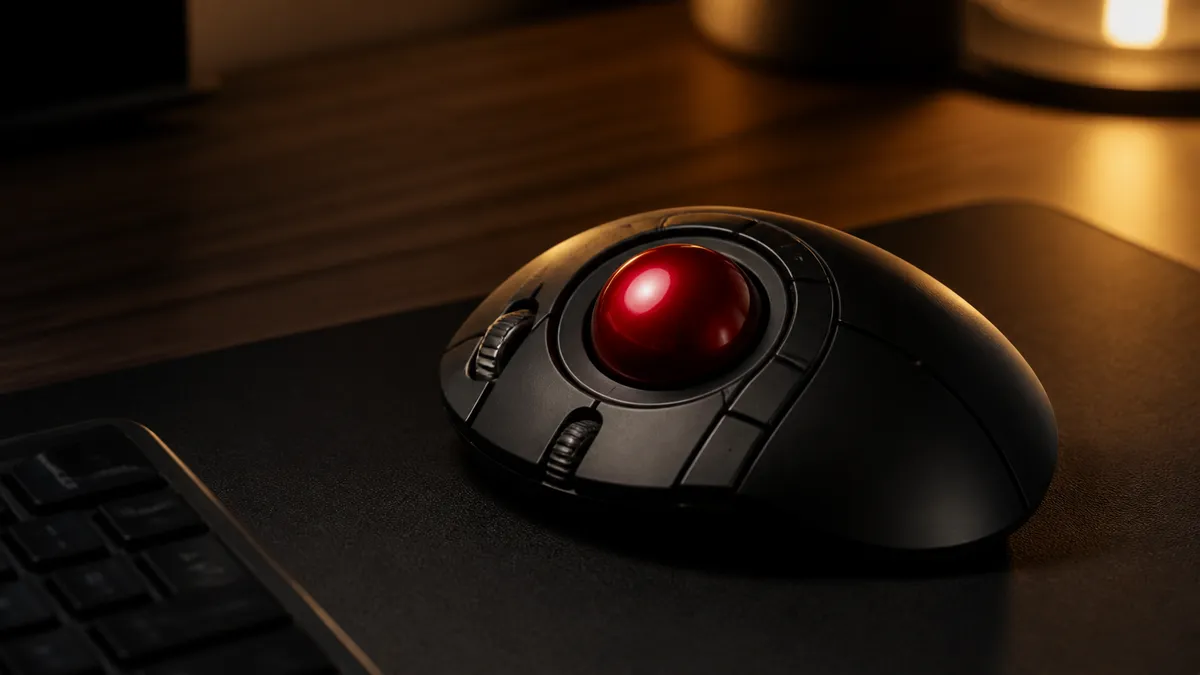
The ELECOM DEFT PRO (M-DPT1MRXBK) is the middle path. It keeps the centered 44 mm ball and an eight-button layout, but in a body of roughly 4.3 by 5.3 inches that sits beside a keyboard without rearranging everything around it. If you want finger operation without building the desk around the pointing device, this is the ELECOM to look at first.
The honest caveat comes just as early: this is an older platform. Its wireless and software stack is less current than ELECOM’s newest hardware, and button customization depends on utility software whose support varies by operating system. DEFT PRO earns its place on hardware layout and connection flexibility, not on being new.
Best compact finger trackball
ELECOM DEFT PRO Trackball
M-DPT1MRXBK · Finger-operated
A middle-ground finger trackball with a 44 mm ball, three connection methods, tilt scrolling, and a shape that occupies less desk depth than the HUGE family.
- Best for
- Users who want finger control without the HUGE Plus footprint
- Connections
- Bluetooth · 2.4GHz USB · USB wired
- Controls
- 8 buttons
DEFT PRO at a glance
| Specification | ELECOM DEFT PRO |
|---|---|
| Model | M-DPT1MRXBK |
| Operation | Index/middle finger on a centered ball |
| Ball diameter | 44 mm |
| Buttons | 8, with tilt-wheel directions assignable (10 assignable inputs total per ELECOM) |
| Connections | Bluetooth, 2.4GHz USB receiver, wired USB |
| Power | One AA battery when wireless; no battery needed wired |
| Ball support | Artificial-ruby contact points |
| Footprint | Roughly 4.3 × 5.3 inches |
Three connection modes on one device is still unusual at this size. It means the same trackball can be paired to a laptop over Bluetooth, switched to the low-latency 2.4GHz receiver on a desktop, or run in wired mode with no battery installed at all.
What DEFT PRO gets right
Finger control without the giant footprint
A centered ball changes how pointing feels. Instead of gripping and sliding a device, your hand rests still while the index and middle fingers roll the ball. Large cursor movements become a flick; fine positioning becomes a fingertip adjustment. The 44 mm ball is large enough for that division of labor to work, while the body stays close to the footprint of a big conventional mouse.
That balance is the whole pitch. ELECOM’s own HUGE Plus takes the same concept further — a 52 mm ball and a full palm rest — but demands about seven inches of desk depth. DEFT PRO delivers most of the control style in a shape that coexists with a normal keyboard tray, a shared desk, or a compact workstation.
Three connection modes cover real setups
The M-DPT1MRXBK connects by Bluetooth, by its 2.4GHz USB receiver, or by a USB cable. Each mode has a practical use: Bluetooth for laptops and tablets without free ports, the receiver for desktops where reliability matters more than pairing, and the cable for a fixed workstation where charging or swapping batteries is one more thing to forget.
Wired mode also works without a battery installed, which quietly solves the worst trackball failure mode: the device dying in the middle of a workday with no spare AA in the drawer. Plug it in and keep working.
Eight buttons, honestly useful
With the tilt wheel’s two directions counted, ELECOM lists ten assignable inputs. That is enough for back and forward, copy and paste, a browser-tab cycle, or application-specific commands, without reaching for the keyboard. The layout places buttons where thumb and outer fingers already rest, so assignments stay reachable rather than theoretical.
Customization runs through ELECOM’s Mouse Assistant utility, and this is where expectations should be calibrated — more on that below.
Predictable AA power
Wireless operation uses one AA battery. A replaceable cell is less elegant than an internal rechargeable, but it fails predictably: swap the battery or attach the cable, and you are back to work in seconds. There is no charging cable to forget and no aging internal battery to shorten the device’s useful life.
The limitations to accept before buying
It is an older platform
DEFT PRO has been on the market for years. Its Bluetooth generation, receiver technology, and bundled software are all older than what ships with ELECOM’s current flagship. Basic pointing is not the concern — a trackball’s core job has not changed — but buyers who want the newest connectivity stack or the most current software support should compare against HUGE Plus before deciding.
Software support varies by OS
ELECOM Mouse Assistant handles button remapping, and its support differs across operating systems and versions. Mac users in particular should verify the current utility version against their macOS release before buying the device primarily for its extra buttons. The hardware can point and click normally even where full customization is not available — but if remapping is the reason you are paying for eight buttons, confirm it first.
Fixed ruby supports, not serviceable bearings
The ball rests on artificial-ruby contact points. They are smooth and durable, but unlike HUGE Plus’s removable bearing units, they are not a user-serviceable system. In practice this means routine cleaning — every mechanical trackball collects skin oil and dust at its support points — rather than part replacement. The ball can be pushed out through an opening on the base for cleaning, which should be treated as normal ownership, not a defect.
A learning curve still applies
Nobody moves from a conventional mouse to a finger trackball without an adjustment period. Cursor precision feels strange for a few days, and fast-twitch gaming is not the use case. Buy it for desk work — documents, spreadsheets, browsing, editing — and give it a week before judging.
DEFT PRO vs the rest of ELECOM’s lineup
We compare all three current options in detail in our ELECOM trackball buying guide. The short version:
| If you want… | Choose |
|---|---|
| Maximum controls, biggest ball, multi-device switching, serviceable bearings | HUGE Plus |
| Finger control in a body that fits a normal desk | DEFT PRO |
| The most familiar, lowest-commitment first trackball | EX-G (thumb-operated) |
DEFT PRO is the middle child in the best sense. It gives up HUGE Plus’s palm rest, rechargeable battery, and bearing system, and in exchange it fits places HUGE Plus never will. Against EX-G, it trades the familiar thumb layout for the finger-operated style that many long-term trackball users end up preferring.
Who should buy it?
DEFT PRO is a good fit if:
- You want index- or middle-finger ball control rather than a thumb ball.
- Your desk cannot absorb the HUGE Plus footprint.
- You value having Bluetooth, a 2.4GHz receiver, and wired mode on one device.
- You prefer predictable AA power or battery-free wired use.
- Your OS is covered by the current Mouse Assistant version, or you can live with default buttons.
Skip it if:
- You want the newest platform — HUGE Plus is the more current hardware.
- You need guaranteed full button customization on an uncommon OS setup.
- You have never used a trackball and want the gentlest entry — EX-G’s thumb layout adapts faster.
- You mostly play fast-paced games.
Frequently asked questions
Is the DEFT PRO good for beginners?
It can be, but the finger-operated layout has a steeper adjustment curve than a thumb trackball like the EX-G. First-time trackball users who want the easiest transition usually adapt faster to a thumb ball. First-time users who already know they want finger control can start here without buying twice.
Does it work without the receiver?
Yes. Bluetooth pairing and wired USB both work without the 2.4GHz receiver. The receiver is one of three options, not a requirement — useful if your laptop has no free USB-A port.
Can I use it while it charges?
There is nothing to charge. Wireless mode runs on one AA battery, and wired mode powers the device through the cable with no battery installed.
Is a 44 mm ball big enough?
For desk work, yes. A larger ball like HUGE Plus’s 52 mm unit covers more screen distance per roll and feels more deliberate, but 44 mm is comfortably above the size of thumb-trackball balls and supports both broad sweeps and fine adjustments. Diameter matters less than whether finger operation suits you at all.
Does it help with wrist pain?
A trackball removes the need to slide the whole device, which changes where repeated movement happens — it does not medically treat anything. Persistent pain deserves an ergonomic assessment rather than a hardware purchase alone.
Final verdict
DEFT PRO remains the most practical way into finger-operated trackballs. The 44 mm centered ball, ten assignable inputs, and three connection modes deliver the substance of ELECOM’s flagship concept in a body that respects the rest of your desk. The compromises — an older platform, OS-dependent software, fixed ruby supports — are real but predictable, and none of them touches the core pointing experience.
Buy it for the layout and the flexibility. Verify the software support for your OS first. And if your desk has seven inches of depth to spare and your budget stretches further, read our comparison before deciding — the HUGE Plus argument is desk space, not capability.
Verify Mouse Assistant support for your OS first
ELECOM DEFT PRO Trackball
M-DPT1MRXBK · Finger-operated
A middle-ground finger trackball with a 44 mm ball, three connection methods, tilt scrolling, and a shape that occupies less desk depth than the HUGE family.
- Best for
- Users who want finger control without the HUGE Plus footprint
- Connections
- Bluetooth · 2.4GHz USB · USB wired
- Controls
- 8 buttons
Sources and methodology
This is a research-based buying guide, not a hands-on test. Specifications were checked against the manufacturer’s published product pages and manuals on August 15, 2026. Retail availability and pricing change independently of these specifications.