
Desk Setup
ELECOM Relacon Review: The Handheld Trackball You Use Without a Desk
A research-based review of the ELECOM Relacon (M-RT1BRXBK): a Bluetooth trackball you hold like a remote, with a 25 mm ball, ten programmable buttons, and no need for a flat surface.
Research note: This guide compares published specifications and current retail information. It is not presented as a hands-on test.
Disclosure: As an Amazon Associate I earn from qualifying purchases. Product links marked “paid link” may earn AmeChoi a commission.
Contents
- Relacon at a glance
- What the Relacon gets right
- It removes the last requirement a trackball still has
- Ten buttons put a shortcut set in one hand
- Media control and presentation use are first-class, not afterthoughts
- Three sensitivity steps matter more here than on a desk trackball
- The limitations to accept
- The whole cursor workload lands on one thumb
- AA batteries, not a rechargeable cell
- The controls are dense, and accidental presses are the recurring complaint
- Fine, sustained precision is not what this shape is for
- Relacon vs the rest of the ELECOM trackball lineup
- Who should buy it?
- Frequently asked questions
- Does it work with a Mac?
- Can left-handed users use it?
- Is there a version that does not use Bluetooth?
- How long does the battery last?
- Can I remap the buttons?
- Is it good for gaming?
- Final verdict
- Sources and methodology
Every trackball solves the same problem the same way. Because the ball moves instead of the body, the device stops sliding around, and a hand that used to sweep across a desk now sits still. That is the whole pitch, and it is a good one.
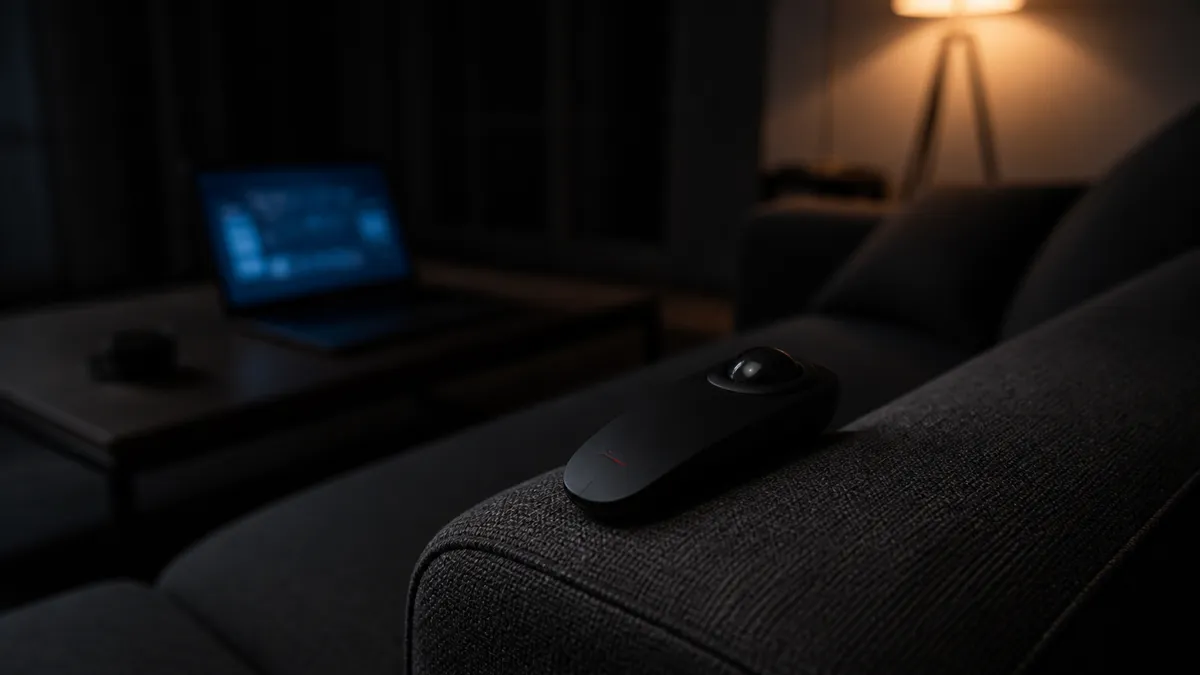
The ELECOM Relacon starts a step earlier and asks a stranger question: what if you did not need the desk at all? The Relacon is shaped like a television remote. You wrap one hand around it, roll a 25 mm ball with your thumb, and the cursor moves. Nothing rests on a surface, nothing slides, and no flat area is required — so the device works identically on a sofa arm, in bed, on a lectern, on a train tray table, or standing in front of a projector.
That is an unusual thing to want until the day you want it badly. Almost every pointing device on the market assumes a desk, and the moment you are not at one, the fallback is a laptop trackpad or a phone screen pretending to be a mouse.
The short answer: the Relacon is the best answer available when the computing happens away from a desk, and a poor choice when it does not. Judged as a desk trackball it is beaten by ELECOM’s own lineup on ball size, precision, and comfort. Judged as the thing you reach for on a couch, a hospital bed, or a conference stage, it has almost no competition.
The trackball for computing away from a desk
ELECOM Relacon Handheld Trackball (Bluetooth)
M-RT1BRXBK · Handheld, thumb-operated
A trackball shaped like a remote: held in one hand, driven by the thumb on a 25 mm ball, with ten programmable buttons and no need for a surface to rest on.
- Best for
- Computing away from a desk: couch, bed, stage, or anywhere without a flat surface
- Form factor
- Handheld, remote-style grip
- Ball
- 1.0 in (25 mm), thumb-operated
- Resolution
- 500 / 1000 / 1500 DPI
- Power
- One AA battery, auto sleep
Relacon at a glance
| Specification | ELECOM Relacon (Bluetooth) |
|---|---|
| Model | M-RT1BRXBK |
| Form factor | Handheld, remote-style grip |
| Operation | Thumb on a 1.0 in (25 mm) ball |
| Buttons | 10 customizable buttons |
| Scroll | Four-direction scroll wheel (vertical and horizontal) |
| Connection | Bluetooth wireless |
| Sensor resolution | 500 / 1000 / 1500 DPI, switchable |
| Power | One AA battery, with auto sleep |
| Rated operation | About 137 hours high-speed mode, about 235 hours low-energy mode |
| Dimensions | 2.24 in W x 5.39 in D x 1.75 in H |
| Weight | About 3.8 oz with battery |
| Supported OS | Windows 11 / 10 / 8.1 / 7, Windows RT 8.1, macOS 10.12 or later |
| Handedness | Usable with either hand |
ELECOM USA also lists a wireless-USB-receiver version of the same body, the M-RT1DRBK, for machines where a receiver is easier than pairing. The physical design, ball, and button count are the same; the difference is how the device connects.
What the Relacon gets right
It removes the last requirement a trackball still has
A conventional trackball frees you from moving the device. It does not free you from putting the device somewhere. It still needs a stable, roughly level place to sit, which is exactly what a couch, a bed, a lectern, and a plane seat do not reliably provide.
The Relacon is held, so the reference surface is your own hand. Posture stops being a constraint on cursor control: you can be reclined, standing, leaning, or lying down, and the device behaves the same. This is a small conceptual change that produces a large practical one, and it is the entire reason the product exists.
Ten buttons put a shortcut set in one hand
A handheld device that only moved a cursor would be a novelty, because the other hand is usually nowhere near a keyboard when you are using one. ELECOM’s answer is button count: ten programmable buttons plus a four-direction scroll wheel, arranged around a grip so that the common ones fall under the thumb and index finger.
With ELECOM’s Mouse Assistant utility — check the current release for your platform, since ELECOM’s own pages differ on which operating systems it covers — those buttons can be reassigned to the functions you actually need in a given position: copy, paste, browser back and forward, window switching, media transport. The practical result is that a surprising amount of routine work can be driven from one hand, without reaching for a keyboard that may be across the room.
Media control and presentation use are first-class, not afterthoughts
ELECOM markets the Relacon for presentations, couch browsing, and media control, and the hardware matches that description rather than merely tolerating it. Holding a device at chest height and advancing slides with a thumb is a natural motion; doing the same thing with a desk mouse balanced on a podium is not.
The same logic covers the living-room case. If a laptop or mini PC drives a television, the Relacon is a far better remote than a wireless mouse resting on a cushion, because cushions are not surfaces.
Three sensitivity steps matter more here than on a desk trackball
ELECOM publishes three switchable resolution settings — 500, 1000, and 1500 DPI — and they do more work here than on a desk trackball. A held device is a less stable platform than a desk-mounted one, so the useful sensitivity varies more by context: a slow setting for accurate clicking while reclined, a fast one for crossing a large television screen. Having that range available is the difference between adapting to a new position and giving up on it.
The limitations to accept
The whole cursor workload lands on one thumb
Desk trackballs distribute effort: the palm rests, the fingers or thumb roll, and the arm does nothing. The Relacon adds a second job — the hand also has to hold the device, which weighs about 3.8 oz with its battery. That is light, but it is not zero over a long session.
Anyone with existing thumb or grip discomfort should treat this as a warning rather than a detail. The device is at its best in sessions measured in minutes to an hour, not in eight-hour workdays.
AA batteries, not a rechargeable cell
The Relacon takes a single AA battery. ELECOM rates continuous operation at roughly 137 hours in high-speed mode and 235 hours in low-energy mode, with auto sleep in between, so replacement is infrequent — but it is a replacement, not a recharge.
This is a recurring complaint in publicly posted owner reviews, and the objection is not really about runtime. It is that a device carried around the house, and often left in a bag or under a cushion, is the kind of thing people expect to top up with a cable in 2026. If a rechargeable cell is a requirement, this is the wrong product, and no amount of rated battery life changes that.
The controls are dense, and accidental presses are the recurring complaint
Ten buttons on a body small enough to grip means the buttons are close together and always under a finger. Recurring themes in public owner reviews include pressing the speed control by accident mid-use and the ball dislodging if the device is dropped — both direct consequences of the handheld form rather than defects.
Neither is difficult to live with once known. Remapping or ignoring the buttons you never use reduces the first; the ball seats back in place after the second. But a device you hold gets bumped, tilted, and dropped in ways a desk device never does, and the design accepts that trade to gain freedom of posture.
Fine, sustained precision is not what this shape is for
A 25 mm ball rolled by a thumb on an unsupported hand is nimble and honest about its ceiling. Detailed selection work, image editing, CAD, and long spreadsheet sessions are all better on a large finger-operated ball with a supported wrist. The Relacon is a device for navigating, reading, presenting, and controlling — not for producing detailed work for hours.
Treating it as a full-time mouse replacement is the one clearly wrong way to buy it.
Relacon vs the rest of the ELECOM trackball lineup
Our ELECOM trackball comparison covers the desk models in depth. Positioned against them, the Relacon is not a step up or down — it is a different axis:
| If you want… | Choose |
|---|---|
| To use a pointer with no desk at all — couch, bed, stage, tray table | Relacon |
| The easiest first trackball for a small desk | EX-G |
| Finger control and three connection modes on a normal desk | DEFT PRO |
| Maximum ball, buttons, and palm support for all-day work | HUGE Plus |
The useful way to read that table is that the Relacon is a second device for most people rather than a first one. It does not replace the trackball or mouse on the desk; it covers the hours spent away from it.
Who should buy it?
The Relacon is a good fit if:
- You regularly drive a computer or television from a couch, bed, or recliner.
- You present standing up and want cursor control, not just slide advance.
- Limited mobility, injury, or recovery makes a desk position difficult or temporary.
- You work in places without stable surfaces — trains, waiting rooms, workshops, field sites.
- You already own a desk pointing device and are filling a gap rather than replacing it.
Skip it if:
- You want one device for eight hours of detailed work at a desk.
- You have thumb, grip, or wrist pain that gripping would aggravate.
- A rechargeable battery is a firm requirement.
- You need the glide and precision of a large finger-operated ball.
Frequently asked questions
Does it work with a Mac?
ELECOM lists macOS 10.12 or later alongside Windows 11, 10, 8.1, 7, and Windows RT 8.1. Core pointing and clicking behave as a standard wireless pointing device; custom button assignment depends on ELECOM’s Mouse Assistant utility, whose feature support varies by platform and OS version. Confirm the current utility release if remapping is essential to you.
Can left-handed users use it?
Yes. ELECOM describes the Relacon as usable with either hand, which is unusual for a thumb-operated design — most thumb trackballs are shaped for one side only. The symmetrical grip is one of the quieter advantages of the handheld format.
Is there a version that does not use Bluetooth?
Yes. ELECOM USA lists the M-RT1DRBK, a wireless version of the same body that connects through a USB receiver. Choose it if the host machine has no usable Bluetooth or if pairing across shared machines would be a nuisance, and choose the Bluetooth M-RT1BRXBK reviewed here if you would rather not occupy a port or track a receiver.
How long does the battery last?
One AA battery, rated by ELECOM at about 137 hours of continuous operation in high-speed mode and about 235 hours in low-energy mode, with an auto sleep mode between sessions. Those are rated figures under the manufacturer’s assumptions rather than promises, but the practical pattern is battery changes a few times a year for typical evening use.
Can I remap the buttons?
Ten of the controls are customizable through ELECOM’s Mouse Assistant utility, which is where the device earns its keep — the default assignments are sensible, but the value of a one-handed device rises sharply when the buttons match the three or four things you actually do from the couch. The hardware works as a normal pointing device without the utility installed.
Is it good for gaming?
For casual, strategy, and media-heavy use, it is workable. For fast-twitch action games it is not, and the handheld format makes that more true than for desk trackballs, not less. Buy it for navigation and control, not for aim.
Final verdict
The Relacon is a narrow product that is excellent inside its lane and mediocre outside it. Every compromise it makes — small ball, dense buttons, thumb workload, AA battery — buys the same thing, which is a pointing device that does not care what your body is doing or what furniture is nearby.
If your computing already happens at a desk, buy a desk trackball instead; ELECOM makes three better ones for that job. If a real part of your week happens on a couch, in a bed, on a stage, or anywhere a mouse has nowhere to sit, the Relacon is close to the only device designed for it, and the alternatives — a trackpad at arm’s length, a phone acting as a remote — are worse in ways you already know.
Judge it as a second device covering the hours away from your desk, and it is a straightforward recommendation.
Best as a second pointer for desk-free hours
ELECOM Relacon Handheld Trackball (Bluetooth)
M-RT1BRXBK · Handheld, thumb-operated
A trackball shaped like a remote: held in one hand, driven by the thumb on a 25 mm ball, with ten programmable buttons and no need for a surface to rest on.
- Best for
- Computing away from a desk: couch, bed, stage, or anywhere without a flat surface
- Form factor
- Handheld, remote-style grip
- Ball
- 1.0 in (25 mm), thumb-operated
- Resolution
- 500 / 1000 / 1500 DPI
- Power
- One AA battery, auto sleep
Sources and methodology
This is a research-based buying guide, not a hands-on test. We have not tested the Relacon ourselves. Specifications were checked against the manufacturer’s published product pages on September 4, 2026, and reflect the figures ELECOM publishes for the US market. Owner reactions are summarized from publicly posted reviews as recurring themes, without quoting or scoring them. Retail availability and pricing change independently of these specifications.